
Mobile app
Your whole payments business, on your phone.
Tap to Pay with no hardware, send invoices and payment links, trigger instant payouts, fight disputes, and ask your AI assistant anything. Free on iPhone and Android.
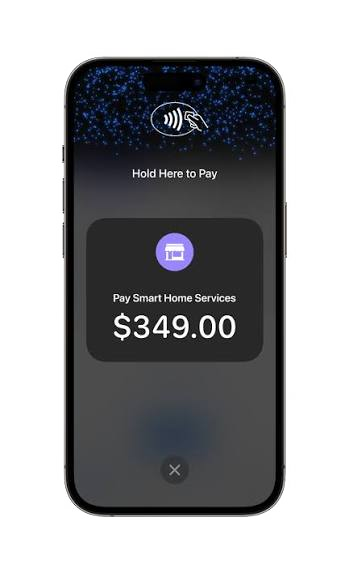
Everything in the dashboard. Built for one hand.
The HL Hunt app is not a cut-down companion. It is the full platform, redesigned for the moments you are standing in front of a customer, driving between jobs, or checking the day from the couch.
Tap to Pay, no hardware
Accept contactless cards, Apple Pay, and Google Pay by holding them to the back of your phone. No reader, no dongle, no shipping delay.
Key-in and send links
Type a card for phone orders, or text and email a payment link or invoice in two taps. Customers pay on their own device.
Payouts you can see
Watch each sale settle in real time and trigger an instant payout to your bank before you leave the job site.
Alerts that matter
Push notifications for every payment, refund, dispute, and payout, with the option to mute the noise and keep only what you care about.
Your AI assistant, in your pocket
Ask how much you made this week, which invoices are overdue, or why a payment was declined. Get a plain-English answer in seconds.
Disputes handled from your phone
When a chargeback hits, upload a photo of the receipt or signed work order and let the dispute agent build and file the response.
Live reporting
Daily, weekly, and monthly sales, top customers, and fee breakdowns in one swipe. Export to CSV or share a PDF.
Face ID and PIN
Biometric login, per-staff PINs with role-based permissions, and remote sign-out if a device goes missing.
Get set up in the time it takes to download.
- 1
Download
Install from the App Store or Google Play.
- 2
Sign in
Use your HL Hunt login, or create an account in the app.
- 3
Take a payment
Tap a card to the back of your phone. Done.
Not a customer yet? Create your account
Mobile app FAQ
Which devices does the HL Hunt app support?
iPhone XS or newer running iOS 16.4+ for Tap to Pay, and Android phones running Android 10+ with NFC. Older devices can still use the app for invoicing, payment links, keyed-in payments, and reporting.
Is the app free?
Yes. The app is free to download and there is no monthly fee. You pay the same per-transaction rate as every other HL Hunt channel.
Do I need a card reader?
No. Tap to Pay uses the NFC chip already in your phone. If you prefer a dedicated terminal for a counter, HL Hunt also supports standalone POS hardware that shares the same account.
Can my staff use the app too?
Yes. Add team members from the dashboard, give each one a PIN and a role, and they can take payments on their own phones. You see every sale by employee.
Does the app work offline?
Payments require a connection to authorize, but the app is tuned to work on weak 2G and 3G signals. Invoices and notes you draft offline sync when you reconnect.
Is the mobile app the same account as the web dashboard?
Yes. One login, one ledger. Anything you do in the app shows up in the dashboard instantly, and vice versa.
Looking for Tap to Pay details? Tap to Pay on iPhone · Tap to Pay on Android
Download the app and take your first payment today.
One account for web, mobile, and in-person. Approved up front, no monthly fee, same-day payouts.