
Integrating into Webhooks
Use webhooks to subscribe to automated notifications (events) from HL Hunt.
When an event is triggered, HL Hunt sends an HTTP POST request to the endpoint URL configured in the webhook. Rather than requiring your servers to manually poll the API, webhooks push notifications to your endpoint proactively.
With webhooks, you can keep up with asynchronous state changes. Examples include:
Transferis created.Merchantis approved.Disputeis opened.
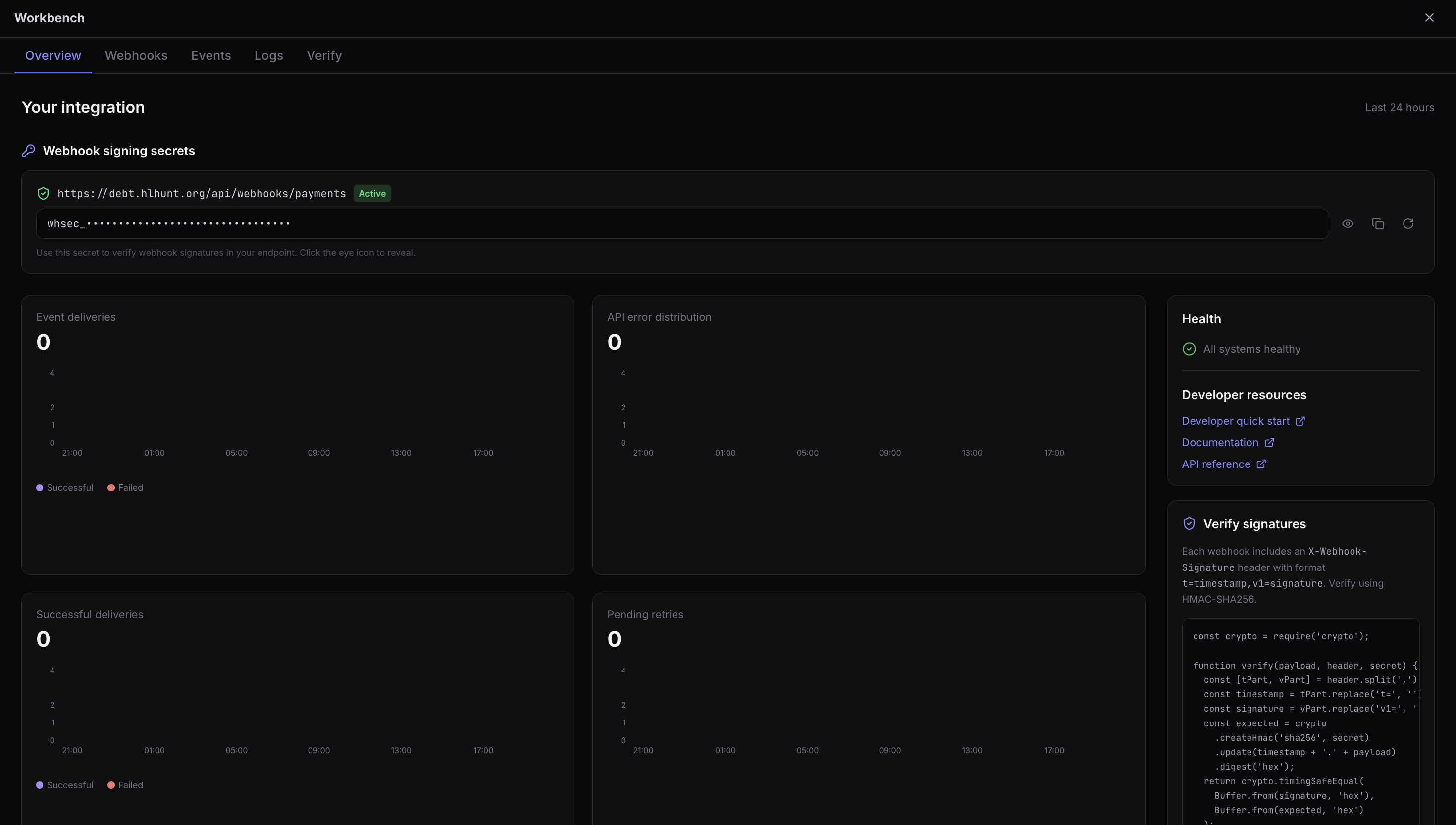
Managing Webhooks via Dashboard
HL Hunt supports creating and updating webhooks through the Dashboard with the following options:
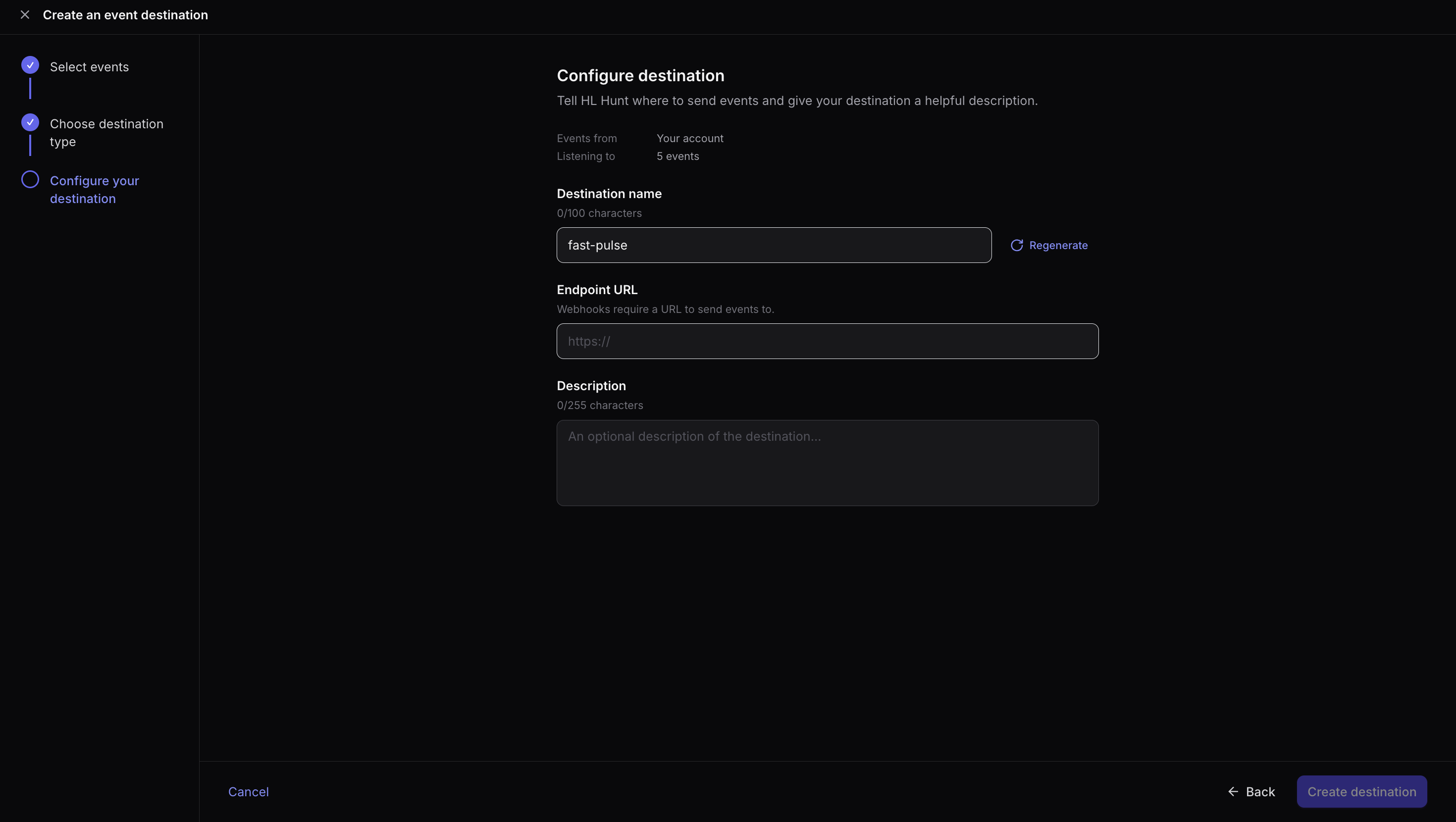
- Set URL: Set the URL you'd like HL Hunt to send webhooks to.
- Set Authentication: Choose Basic or Bearer authentication (recommended), or no authentication.
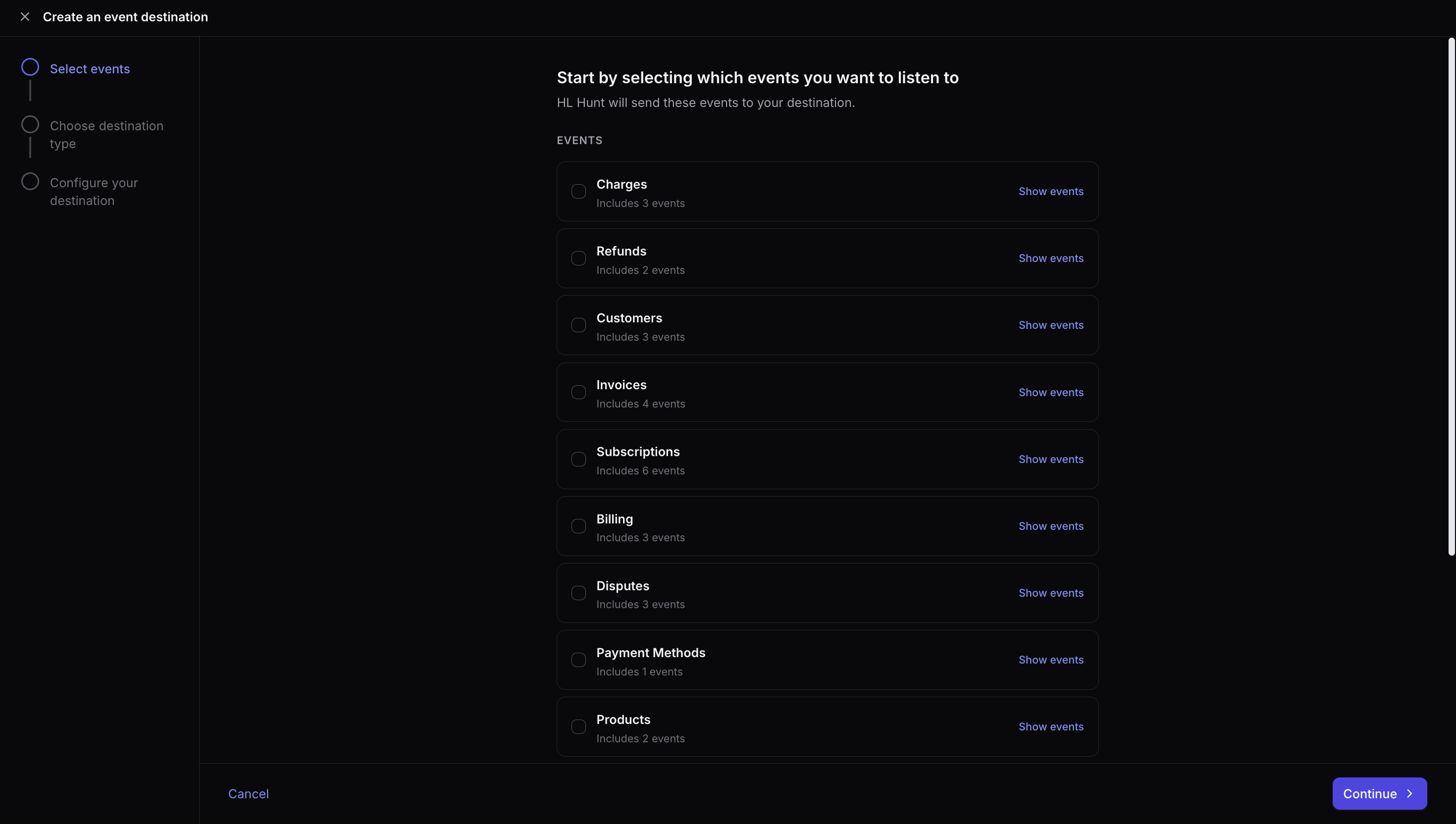
- Filter Events: Subscribe to all events, or choose specific events.
- Update Webhooks: Update existing webhooks (change URL or events).
- Disable Webhooks: Disable webhooks you no longer use.
Viewing Webhooks
To create or update webhooks, navigate to Developers > Webhooks. There, you will see a list of all webhooks you have created.
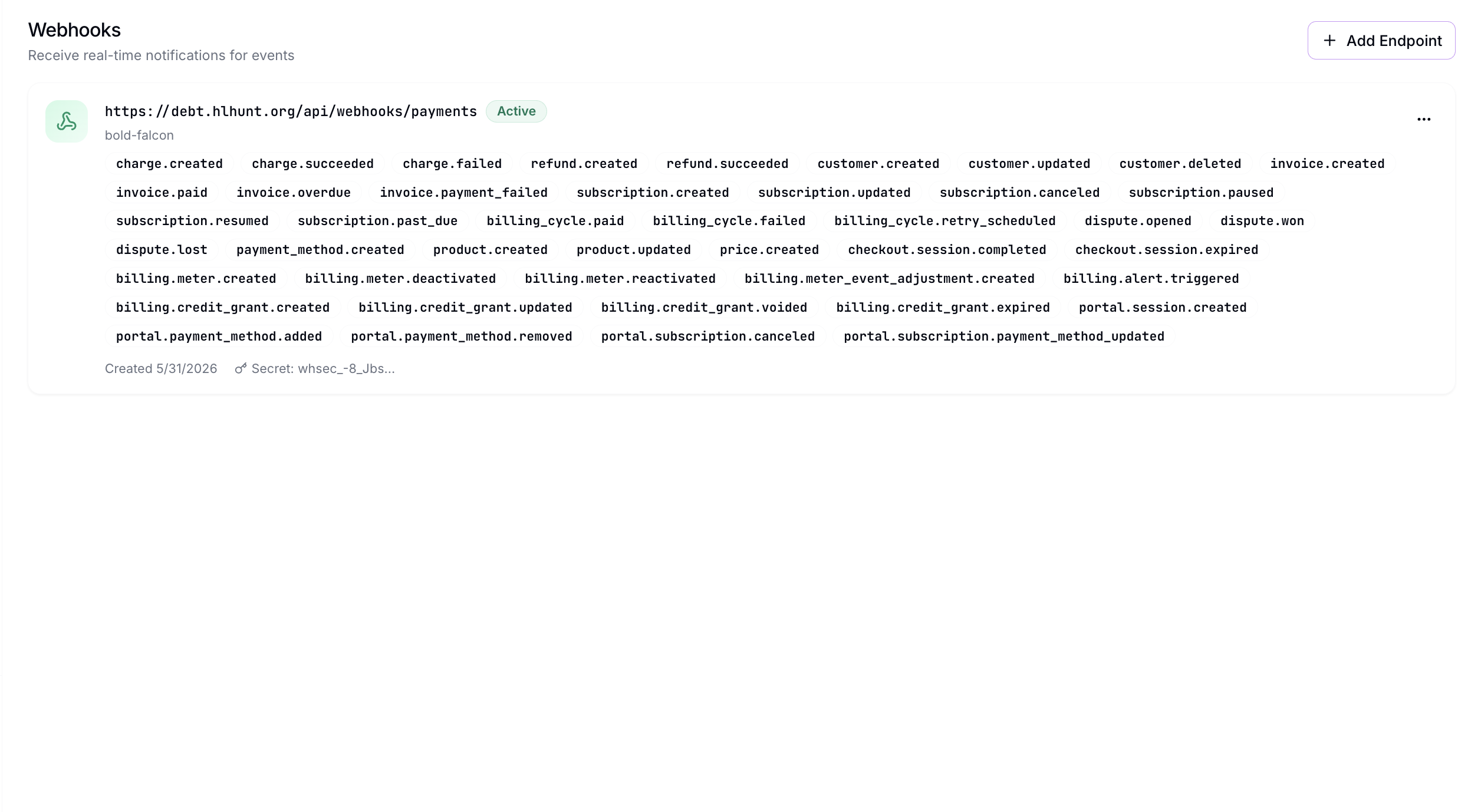
Creating Webhooks
Click Create Webhook to create a new webhook. You'll set the URL, Authentication Type, and Events you'd like to subscribe to.
Managing Webhooks via API
You can also create and manage webhooks programmatically via the HL Hunt API.
Creating a Webhook
POST /api/v1/webhooks
Authorization: Bearer sk_live_your_api_key

{
  "url": "https://your-server.com/webhooks/hlhunt",
  "events": ["charge.succeeded", "refund.created", "dispute.opened"],
  "description": "Production webhook"
}
The response includes a secret (signing key) that you use to verify incoming webhook payloads:
{
  "id": "we_abc123",
  "object": "webhook_endpoint",
  "url": "https://your-server.com/webhooks/hlhunt",
  "description": "Production webhook",
  "secret": "whsec_xxxxxxxxxxxxxxxxxxxxxxxxxxxxxxxx",
  "active": true,
  "events": ["charge.succeeded", "refund.created", "dispute.opened"],
  "created": "2026-06-23T00:00:00Z"
}
Store your signing secret securely
The secret is only returned once when the webhook is created. Store it securely — you'll need it to verify that incoming events are genuinely from HL Hunt.
Listing Webhooks
List every webhook endpoint on your account. The signing secret is only ever returned once at creation, so it is omitted here.
GET /api/v1/webhooks
Authorization: Bearer sk_live_your_api_key
{
"object": "list",
"data": [
{
"id": "we_abc123",
"object": "webhook_endpoint",
"url": "https://your-server.com/webhooks/hlhunt",
"description": "Production webhook",
"active": true,
"events": ["charge.succeeded", "refund.created", "dispute.opened"],
"created": "2026-06-23T00:00:00Z"
}
],
"has_more": false
}Updating or disabling an endpoint
The v1 API creates and lists webhook endpoints. To change an endpoint's URL or events, disable it, or delete it, manage it from the Developers → Webhooks dashboard.
Verifying Webhook Signatures
Every webhook event includes a signature header that lets you verify the payload wasn't tampered with and was sent recently.
| Detail | Value |
|---|---|
| Header | X-Webhook-Signature |
| Algorithm | HMAC-SHA256 |
| Format | timestamp=<epoch>, sig=<hex-hmac> |
| Input | timestamp:raw_body |
To validate:
- Parse the
timestampandsigfrom the header. - Ensure the timestamp is within 5 minutes (protects against replay attacks).
- Recompute HMAC-SHA256 of
timestamp:bodyusing the webhook signing key. - Compare signatures using constant-time comparison.
Delivery Attempts and Retries
When a delivery fails, HL Hunt retries up to 5 times using exponential backoff. Any 2xx HTTP status code counts as successful delivery.
| Retry | Delay |
|---|---|
| 1 | 1 minute |
| 2 | 5 minutes |
| 3 | 30 minutes |
| 4 | 2 hours |
| 5 | 24 hours |
After all retries are exhausted, the event will not be resent. Use the API to query resources directly if you suspect missed events.
Test & Live Mode Isolation
Webhook endpoints are mode-scoped. An endpoint created with a live API key (sk_live_) only receives events generated by live transactions. An endpoint created with a test API key (sk_test_) only receives events generated by test transactions. Live events are never delivered to test endpoints, and test events are never delivered to live endpoints.
Every webhook payload includes two fields that identify the mode:
| Field | Values |
|---|---|
livemode | true (live) or false (test) |
environment | "live" or "test" |
We recommend verifying the livemode field in your webhook handler as defence-in-depth, even though mode isolation is enforced at the delivery layer. This protects against misconfigured endpoints and makes the mode explicit in your application logic.
// Example: verify mode in your webhook handler
const payload = JSON.parse(body)
if (payload.livemode === false) {
  // Test event — log and return 200 without processing real orders
  console.log("Test webhook received:", payload.type)
  return respond(200)
}

// Live event — process normally
processOrder(payload)
Register separate endpoints for test and live
If you use the same URL for both test and live webhooks, rely on thelivemode field to distinguish them. For cleaner separation, register different URLs for each mode (e.g./webhooks/hlhunt-test and/webhooks/hlhunt-live).