
Customer Billing Portal
Let your customers manage their own billing — update payment methods, view invoices, cancel subscriptions, and more — without contacting you.
Overview
The Customer Billing Portal is a hosted, white-labeled page where your customers can self-serve their billing lifecycle. It reduces support tickets and gives customers 24/7 access to:
- View and pay invoices
- Update or remove payment methods
- View billing / transaction history
- Cancel or pause subscriptions
- Switch subscription plans (if enabled)
Setting Up the Portal
To set up the Customer Portal from your dashboard:
- Navigate to Customer Portal in the left sidebar.
- A default configuration is created automatically.
- Toggle the features you want customers to access.
- Click Save Configuration.
- Copy the Portal Link shown at the top — this is the URL you share with customers.
Your portal link looks like: https://payments.hlhunt.org/portal/login/your-slug
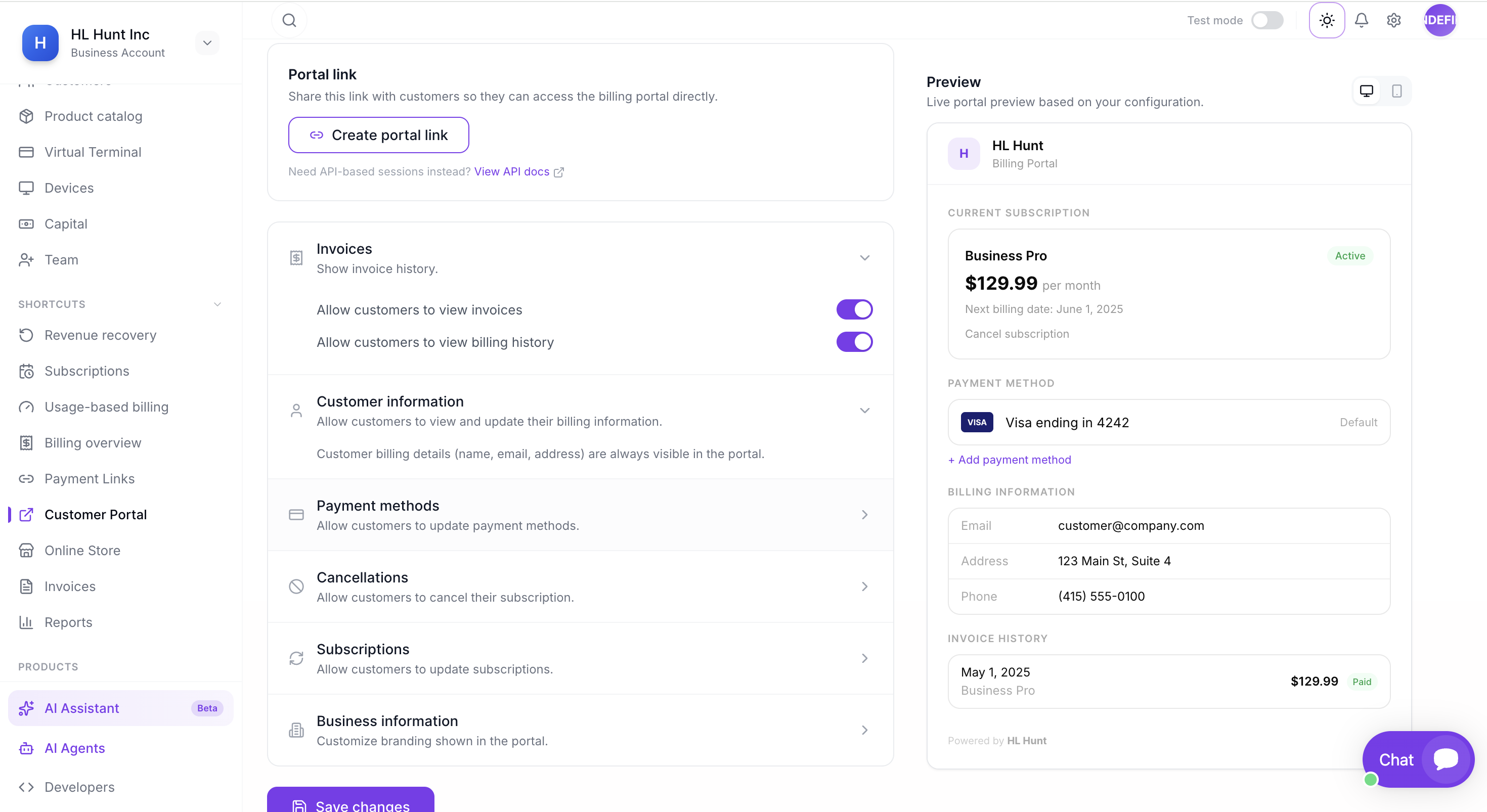
The Customer Portal page — configure features on the left, see a live preview of what your customers will see on the right.
Portal Configuration
You can control exactly what customers see and do. Available settings:
| Setting | Description |
|---|---|
| Invoice History | Customers can view and download past invoices |
| Billing History | Full payment transaction history |
| Update Payment Method | Add or update a card on file |
| Remove Payment Method | Delete saved payment methods |
| Cancel Subscription | Let customers cancel their subscription |
| Pause Subscription | Temporarily pause billing (resumes later) |
| Plan Change | Allow customers to switch between plans |
You can create multiple configurations for different customer segments. Mark one as default.
API Integration
Create portal sessions programmatically to redirect authenticated customers directly into the portal (no OTP required).
Create a Portal Session
/api/v1/portal/sessionscurl -X POST https://payments.hlhunt.org/api/v1/portal/sessions \
-H "Authorization: Bearer sk_live_YOUR_SECRET_KEY" \
-H "Content-Type: application/json" \
-d '{
"customer": "cus_abc123",
"return_url": "https://yoursite.com/account"
}'Response
{
  "id": "bps_abc123",
  "object": "billing_portal.session",
  "url": "https://payments.hlhunt.org/portal/TOKEN",
  "return_url": "https://yoursite.com/account",
  "customer": "cus_abc123",
  "expires_at": 1719300000,
  "livemode": true
}
Redirect the customer to the url returned. The session expires after 24 hours.
Full Integration Example (Node.js)
server.jsconst express = require('express');
const app = express();
const HL_HUNT_SECRET_KEY = process.env.HL_HUNT_SECRET_KEY; // sk_live_...
const HL_HUNT_BASE_URL = 'https://payments.hlhunt.org';
// Route: redirect logged-in customer to their billing portal
app.get('/billing', async (req, res) => {
// 1. Get the customer ID from your database
const customerId = req.user.hlHuntCustomerId; // e.g. "cus_abc123"
// 2. Create a portal session via HL Hunt API
const response = await fetch(
`${HL_HUNT_BASE_URL}/api/v1/portal/sessions`,
{
method: 'POST',
headers: {
'Authorization': `Bearer ${HL_HUNT_SECRET_KEY}`,
'Content-Type': 'application/json',
},
body: JSON.stringify({
customer: customerId,
return_url: 'https://yoursite.com/account',
}),
}
);
const session = await response.json();
// 3. Redirect customer to the portal
res.redirect(303, session.url);
});
app.listen(3000);How it works: Your backend creates a portal session using the customer's ID, then redirects them to the returned URL. The customer lands directly in the portal — no OTP needed since you already authenticated them on your side.
Parameters
| Parameter | Type | Description |
|---|---|---|
| customer | string | Required. The customer ID. |
| return_url | string | Where to redirect after the customer is done. |
| configuration | string | Portal config ID to use (default config if omitted). |
Customer Experience
When a customer visits the portal link, the flow is:
- Customer enters their email on the login page.
- A one-time verification code (OTP) is sent to their email.
- After entering the code, they see their billing dashboard.
- Based on your configuration, they can update cards, view invoices, manage subscriptions, etc.
Note: Customers must have a matching email in your customer records. If no customer is found for the email, they'll see a "no account found" message.
Security
- OTP verification — Email-based one-time codes (6 digits, 10 minute expiry).
- Rate limiting — Max 5 OTP sends per 5 minutes per IP to prevent abuse.
- Session tokens — Cryptographically random, expire after 24 hours.
- API sessions — Created server-side with your secret key. No OTP needed (you authenticated the customer).
- Audit logging — All portal actions are logged for compliance.